Chasing a Vacuum Leak with a Bluetooth OBD-II Adapter
The airbag light in my 2001 Ford Expedition has been on for a while. I wanted to know what it was complaining about without paying a shop to tell me, so I bought a Veepeak OBDCheck BLE adapter, which is about the cheapest way to get a wireless connection to a car’s diagnostic port, and plugged it in under the dash.
Three days later I had 2,500 lines of Python, a web dashboard, and a diagnosis. Not of the airbag light. I will come back to that.
The result is obdscope, which I have open sourced under the MIT license: a command line tool, a web dashboard, and a full vehicle simulator, at roughly 2,500 lines of Python and 56 tests, over eighteen commits between the 21st and the 23rd of September. GitHub can tell you about the twelve commands. What follows is the part that was actually interesting.
Why This Needed Writing at All
Almost every OBD-II tutorial opens by telling you to point your code at /dev/ttyUSB0. That works when the adapter is USB, or when it is Bluetooth Classic and the operating system hands you a serial port for it. On macOS, a Bluetooth Low Energy adapter does neither. It never shows up as a serial port at all. You reach it through CoreBluetooth, which in Python means bleak: discover the peripheral, connect, find the right GATT characteristics, subscribe to notifications, write bytes.
Underneath that layer the adapter is not exotic. It is a UART over Bluetooth. You write a command as plain ASCII, notifications come back, and the response ends with a > prompt meaning the adapter is ready for the next one. Once you have that loop working, everything above it is protocol work.
So the tool is layered, with each piece swappable:
- BLE transport: the connection and the notify/write handling
- ELM327: AT commands, error handling, J1850 and CAN frame parsing
- OBD services: modes 01, 02, 03/07/0A, 04, 09 and 22
- Reports: the multi-request reads, like “tell me everything about this vehicle”
- Front ends: the CLI and the web dashboard, which share those reports
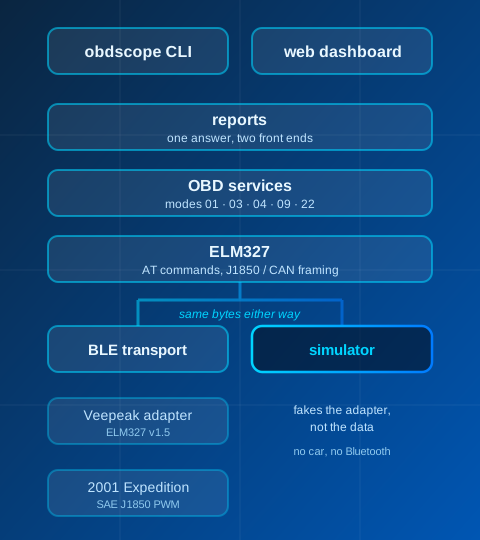
The reports layer is the one that earns its keep. The command line and the dashboard show the same vehicle information because they call the same function, not because I remembered to change both.
The Dashboard
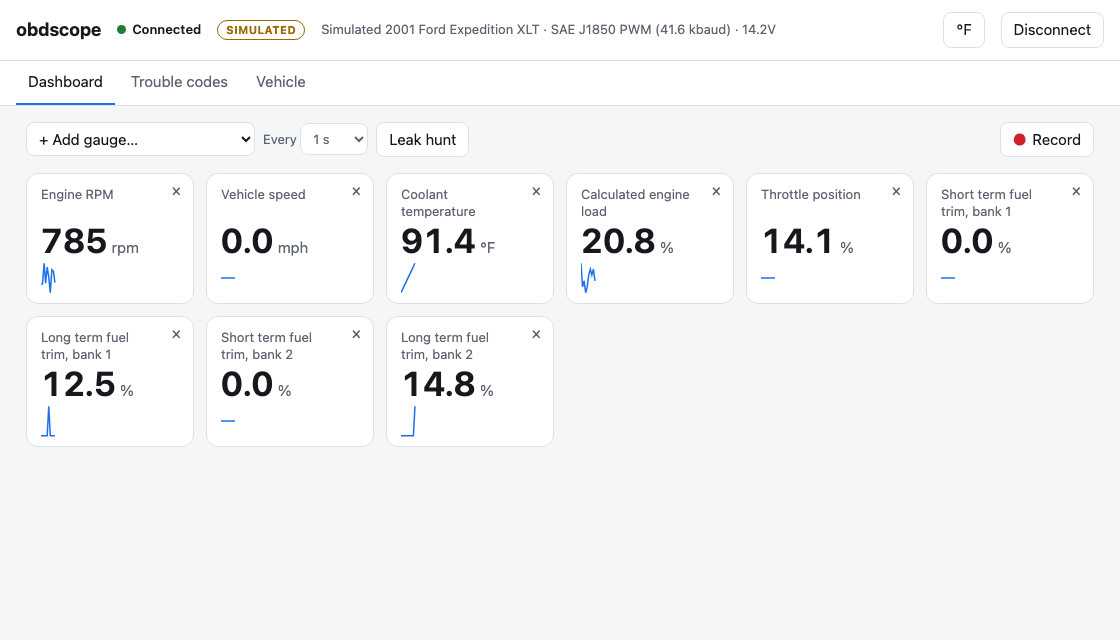
It is aiohttp plus server-sent events, vanilla JavaScript, no build step. One process owns the Bluetooth connection, because the adapter will only accept one, and streams samples out to any tab that happens to be open.
That is a local web server that can clear diagnostic codes, so it is worth being careful about. Three choices, all cheap:
- It binds to loopback by default, so nothing outside the machine can reach it.
- It requires a JSON content type on anything that changes state. A plain HTML form on some other site can POST to
localhostwithout your involvement, and the browser will happily send it. It cannot set that content type without a CORS preflight, which the server will not grant. - It checks the
Hostheader. Loopback binding alone does not stop DNS rebinding, where a hostname you visit resolves to127.0.0.1a moment later and the page starts talking to whatever is listening there.
There is a --host 0.0.0.0 option for reading the dashboard on a phone while you are under the hood, which is genuinely useful, and which the README is blunt about: no password, so only do it on a network you trust.
The Simulator, Which Was the Best Decision I Made
The trick that made the rest of the project pleasant was deciding to fake the adapter rather than fake the data.
A simulator that returns tidy Python objects tests almost nothing, because the hard part of this problem is the wire format, and that is exactly the part such a simulator skips. So the one in obdscope speaks real ELM327 text: AT commands, command echo, J1850 framing with real CRCs, CAN ISO-TP multi-frame responses, SEARCHING..., NO DATA, negative responses. Everything above the transport runs the same code against the simulator that it runs against a car.
There are two profiles. The Expedition: J1850 PWM, a single module. And a 2019 RAV4: CAN, engine and transmission modules answering separately, a wideband O2 sensor, a VIN. Between them they cover both eras of the protocol.
Both drive a repeating two-minute cycle from a cold start: idle, city, highway, then slowing to a stop. Coolant climbs, the fuel system switches from open to closed loop, the O2 sensors start switching, and RPM is derived from speed and gear rather than made up independently. The point is that the numbers move the way real numbers move, so a chart that looks wrong looks wrong.
It paid for itself twice. Its tests caught a crash in probe that would otherwise have hit on the first real successful probe: an import lost in an earlier refactor, on a path that only runs when a module actually answers. And it let me build and screenshot the entire web UI before the adapter ever met the car.
What the Expedition Actually Said
The first real connection failed with UNABLE TO CONNECT, which is the adapter telling you it cannot find a vehicle. There was no key in the ignition, and the engine computer sleeps. That produced two fixes: raw now works with the vehicle asleep, so you can at least ask the adapter its own voltage, and the error message now tells you to turn the ignition on instead of leaving you to guess.
With the key on, it turned out to be talkative:
- It reports a VIN, which is unusual for a 2001 vehicle. Standardized VIN reporting through the diagnostic connector was not required until the 2005 model year.
- Twenty supported sensors, which is about right for a pre-CAN vehicle.
- No trouble codes, and the check engine light is off.
- 11.1V at rest, 13.7V running. 11.1V is not merely low, it is deeply discharged, which is what sitting disconnected will do. The running voltage is at least in the normal charging range, though that on its own is not a charging system test.
- Five readiness monitors incomplete, also from the battery disconnect. A typical US OBD inspection allows a 2001 vehicle at most one incomplete monitor, so it would be turned away today despite having no codes at all.
That last pair is a nice illustration of why the two things are separate questions. “No stored codes” and “ready for inspection” are different claims, and only one of them was true.
The Number That Makes the Article
What fuel trim is, briefly
The engine computer calculates how much fuel to inject, then corrects that calculation based on what the oxygen sensors report. Fuel trim is that correction, as a percentage. Zero means no correction; positive means it is adding fuel because the exhaust is reading lean.
There are two of them. Short term reacts within seconds and swings around constantly. Long term is what the computer has learned over time and stored, so that it does not have to rediscover the same correction on every start. The real correction is the two added together, and a sustained combined correction much beyond roughly plus or minus 10 percent is worth investigating.
Warmed up and idling, the Expedition reported short term fuel trim around 0% and long term at +28% on both banks. The engine is asking for 28% more fuel than its base calculation says it needs, and it has been asking long enough to have written that down. Both banks, equally, which argues against a bank-specific injector or sensor problem and points toward something the two banks share.
The question is what. The useful test compares idle against a held 2000 rpm:
| Idle (700 rpm) | 2000 rpm | |
|---|---|---|
| Airflow | 6.0 g/s | 16.0 g/s |
| Fuel correction | +26.8% | +10.7% |
| Implied extra air | 1.61 g/s | 1.71 g/s |
The percentage falls sharply with engine speed: +26.8% at idle down to +10.7% at 2000 rpm, a drop of 16.1 percentage points. The absolute quantity barely moves, staying within about 6% of itself while the percentage more than halves.
The reasoning is simple once the numbers are in front of you. A hole of a fixed size passes roughly the same mass of air whatever the throttle is doing, so it is a large fraction of the small airflow at idle and a small fraction of the larger airflow at 2000 rpm. A mass airflow sensor reading proportionally low would instead give about the same percentage at both points. Low fuel pressure would get worse under load rather than better. Neither fits. Call it somewhere around 1.6 to 1.7 grams per second of equivalent unmetered airflow, with the caveat that this is a back-of-the-envelope figure derived from two scan tool readings rather than a direct measurement of anything.
Ford Published This Test Twenty Years Ago
The pleasing part came afterwards, when I went looking to see whether the reasoning held up. It does, and it is not original.
Ford TSB 04-17-4, issued in September 2004, applies to 2000–2004 Expeditions among a long list of others. It tells the technician to add long term and short term fuel trim for each bank at idle, hold 2500 rpm, and add them again. Ford’s stated reason is the same argument I had just talked myself into: fuel trims at idle are particularly sensitive to vacuum leaks because the unmetered leakage flow is a higher percentage of total airflow at idle than at part throttle. If the correction drops by more than 15 points, the bulletin says a vacuum leak is most likely the cause. If it stays about the same, it says to look elsewhere. It also notes that a leak bad enough to set a lean code typically shows total correction around +20% or more at idle.
My idle correction was +26.8% and my drop was 16.1 points. I held 2000 rpm rather than Ford’s 2500, so what I have is consistent with the published procedure rather than a clean execution of it. Landing just over a threshold Ford set for this exact generation of Expedition, having arrived at the test from the physics rather than from the bulletin, was the most satisfying twenty minutes of the project.
One caveat that belongs here rather than in a footnote: an exhaust leak ahead of the oxygen sensors produces a very similar signature, because it lets air get drawn in during the low-pressure part of the exhaust pulses, the sensors read lean, and the computer adds fuel it does not need. Cracked exhaust manifolds are a signature failure on the 5.4 Triton. The data I have cannot separate the two cases, and Ford’s bulletin is about vacuum leaks specifically, so it does not settle the question either. It is still unresolved.
Why There Is No P0171
A +28% long term correction with no lean code looked contradictory, and my first explanation was wrong. I assumed the fuel system monitor only evaluated under cruise conditions, where the correction is smaller, and so never looked at idle. It does not work that way: Ford’s fuel system monitor runs continuously whenever the engine is in closed loop, idle included.
The real explanation is better, and it is sitting in the data. Setting a lean code takes the long term trim being high and the short term trim still correcting lean on top of it, because that combination is what says the computer has run out of adjustment. Mine was around +28% long term with short term near zero. The PCM had already learned nearly the whole correction and was no longer fighting anything in real time, so the second condition was never met.
Which is worth remembering the next time someone offers “there are no codes” as evidence that a vehicle is healthy. This one has been quietly compensating for a fault for long enough to have made it look normal.
On the command line the same measurement looks like this, here running against the simulated Expedition, which carries a milder version of the same fault because that is what I built it to reproduce:
             short    long    total   measuring baseline (6/8)
  bank 1     +0.0%  +12.5%   +12.5%
  bank 2     +0.0%  +14.1%   +14.1%
  engine rpm 797 rpm   mass air flow 9.0 g/s   coolant temperature 80.6 °F
  hold steady at idle...
It holds the first eight samples as a baseline, then switches that right-hand column to the change from it, with a bar running from leaner to richer and a line of text saying which way it moved. The web version does the same thing with more room:
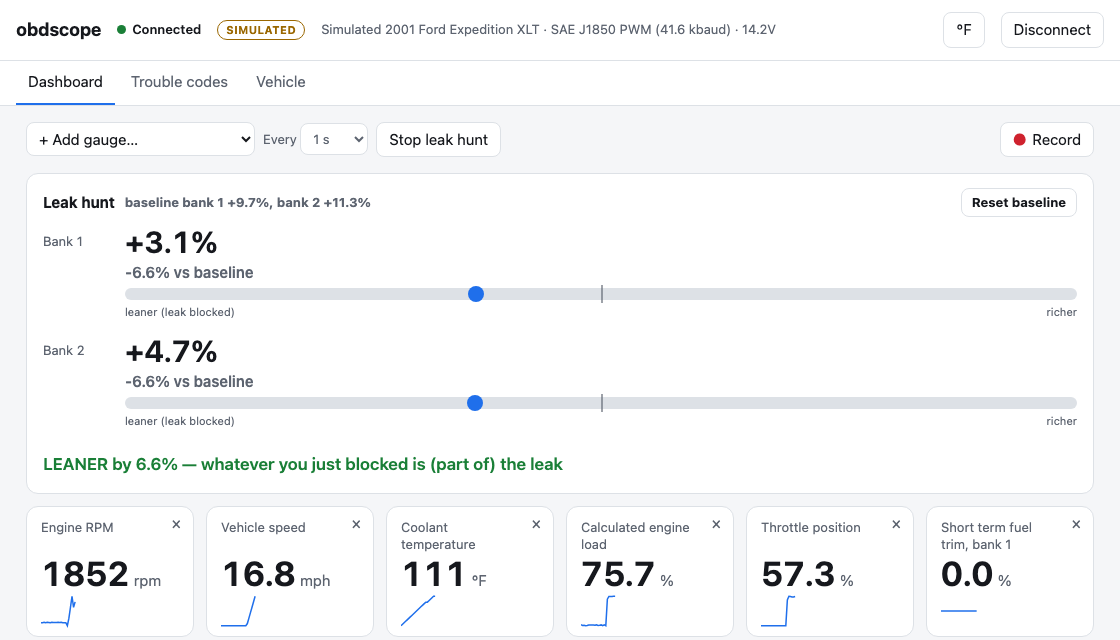
This is not a feature I invented either. Ford’s next step, once the idle-versus-rpm comparison points at a vacuum leak, is to pinch off vacuum lines one at a time and watch short term fuel trim: a shift of more than 15 points in the negative direction means you just blocked the leak. Saying so in words matters more than it sounds, because the alternative is squinting at a scan tool with one hand while holding pinch-off pliers with the other. On a phone propped against the windshield it becomes a one-person job.
Two Experiments with Clean Results
Does Clearing Codes Reset the Learned Fuel Trims?
This is folklore you hear both ways, and it is easy to test. I cleared codes with the engine off, then restarted. Long term fuel trim was back at +28.1% within a minute, with short term sitting near zero.
That is what a value loaded from memory looks like. Relearning looks different: short term does the work while long term climbs toward it slowly. I had the contrast case for free, because the battery had been disconnected earlier, and after that long term genuinely sat at 0% for minutes while short term carried the whole correction.
What makes this more interesting than it first looks is that Ford’s own bulletin warns technicians that the adaptive fuel values will not be available if a KAM or OBD-II reset was recently performed, and instructs them not to clear codes before running the test for exactly that reason. On this PCM, the generic mode 04 clear I sent did not appear to erase the learned correction. I would not generalize that to Ford’s own scan tool, which has a separate KAM reset and may well do more than mode 04 does, but it is a useful thing to know before you throw away your own evidence.
Can You Read Airbag Codes over OBD-II?
Not with the generic OBD-II path I had built. That turns out to be a different statement from the one I first made, which was that the adapter simply is not wired to the restraints module.
My sweep of all 256 addresses found two modules: the PCM at 10 and the instrument cluster at 60. No restraints module. But that sweep ran over J1850 PWM, which is the powertrain network, and on this generation of Ford SUV the restraints control module is not on it. It sits on a separate ISO 9141 diagnostic network, which does reach the same connector under the dash, and which a standard ELM327 adapter has pins for.
So I was looking on the wrong bus with the right cable. Reaching that module would mean switching protocols and implementing the manufacturer-specific diagnostics that live there, none of which is part of generic OBD-II and none of which obdscope does yet. Whether it would then answer, I genuinely do not know.
Two things worth knowing came out of the sweep anyway. Older Fords read codes with mode 13 rather than the standard mode 03, which they reject outright. And the instrument cluster is holding B1600, an anti-theft key transponder fault, plus one more.
The part I was most pleased about is that the decoding validated itself. The PCM returned 10 00 00 00 00 00, which decodes to P1000, meaning “monitors not complete.” That is exactly what a Ford sets after the clear I had just performed. Getting a known-correct answer out of the byte format before trusting it on the cluster’s codes was worth more than any unit test I could have written, because it checked the assumption rather than the implementation.
Bugs That Only Real Hardware Found
The adapter appends <DATA ERROR to any frame that fails its checksum. On a J1850 bus that is ordinary noise and happens a few times a minute. My parser treated it as fatal and aborted the entire read, which meant some commands worked intermittently for no reason I could see from the code. Now it drops the bad frame and retries.
Which gives the line I keep coming back to: the simulator caught a bug the car never would have, and the car caught a bug the simulator never would have. Neither one was a substitute for the other, and I would build it the same way again.
Odds and Ends
Three small things that cost more time than they should have:
- My first headless Chrome screenshot script captured at page load, so a dashboard that fills in from a live stream photographed completely blank. Chrome can wait for dynamic content perfectly well; my capture approach could not. I ended up driving it over its debug protocol instead, so the script opens the page, clicks Connect, waits for real data, and then captures. Both screenshots above came out of that.
- Moving the project directory broke the virtualenv. Virtualenvs record absolute paths and are meant to be recreated rather than moved. Obvious in hindsight, invisible in the moment.
setup-uvpublishes moving major tags only up to v7 while its releases run to v10, so@v10does not resolve at all. That was the state in September 2026 and may well change; either way, pinning the exact version is the better habit.
Open Sourcing a Three-Day Hack
So I open sourced it. obdscope is public on GitHub under the MIT license, which means anyone can read it, fork it, or build something commercial on top of it without asking me first. Getting it to a state where that was a reasonable thing to do took most of the final day, on work that adds no features whatsoever.
There is a CI matrix on GitHub Actions running the tests and pyflakes across Python 3.11, 3.12 and 3.13. The suite is 56 tests and finishes in under two seconds, and it needs no adapter and no car, because it runs entirely against scripted fakes and the simulator. That is the simulator paying for itself a third time: it is the reason someone who owns neither the dongle nor a 25-year-old Ford can clone the repository and watch the whole thing work.
The README grew the sections a weekend project usually skips. A safety and scope section naming the two commands that are not passive, because clear-dtc also resets the readiness monitors and probe sends undocumented manufacturer requests. A no-warranty line. A note not to operate it while driving. The vehicle-specific material moved out into a gitignored notes/ directory, on the grounds that my VIN and my repair history are not documentation. And a section on what has actually been tested, which is the one that makes the rest of the README worth believing: one adapter, one vehicle, and the simulator for everything else, the entire CAN path included. It also points at python-OBD as the established library in this space and explains how this project differs, rather than implying it is better.
I renamed it, too. It started life as veepeak, after the adapter I happened to buy, which is a poor name for something that works with any ELM327 dongle. It is obdscope now, with the adapter named in the README’s first line and in the package keywords instead, so that someone who bought a Veepeak and knows nothing else still finds it. veepeak survives as a command alias, because renaming things out from under people is rude.
The bug report form asks for the vehicle, the adapter and a --log transcript, on the theory that a vehicle-specific report without a transcript is one nobody can act on, me included.
None of that makes it better at reading a car. It is the entire difference between a directory on my laptop and something a stranger can use without me.
What I Am Not Claiming
Three honest limits, since this is the sort of project where it is easy to overstate what has been proven:
- It has been tested against exactly one adapter and one vehicle. The entire CAN path exists only against the simulator. It follows the standards and the parsing is tested, but it has never met a real CAN car.
- The lean condition is characterized, but the source is not isolated. A vacuum leak and an exhaust leak ahead of the oxygen sensors are both still plausible, and nothing is fixed.
- The airbag light, the thing that started all of this, remains unread, and now for a more interesting reason than I first thought.
I set out to read one code and failed. What I got instead was a number: a fuel correction equivalent to roughly 1.6 grams per second of unmetered air entering an engine that has no idea it is there. I would not have had that number from a code reader, or from a shop visit that ended in “no codes stored.” It took building enough of a tool to ask a question the tool was not designed to answer, which is usually where the interesting part of a project starts.
If you want to try it, including the parts that need no car at all:
git clone https://github.com/PaulJulius/obdscope
cd obdscope
uv sync
uv run obdscope ui --simulate expedition